
Two Kinds
- Ours, as PHI⑊PIN. Brand, Wiki, Documents and the like. They wear the PHI⑊PIN brand exactly as philpin.com does: nothing of their own.
- An application with its own name. i2p is the first. It gets its own mark, its own accent colour and its own brand page at its own address, /brand. It still sits inside the PHI⑊PIN family.
Every one is listed on the Switchboard, and logged on the Rollout page as it comes onto the brand.
What Never Changes
- The square at the foot. Every page at every address ends with the PHI⑊PIN square: the door to sign-in. No exceptions, coming-soon screens included.
- Type. The same two typefaces. A mark of its own is drawn from the face of the PHI⑊PIN wordmark.
- The page templates. The same top bar, sub-menu, widths and blocks. An application's own mark sits top left; the PHI⑊PIN mark stays at the centre of the bar.
- Language. The same voice and the same rules.
What an Application Makes Its Own
- A mark, in two versions: one for light grounds, one for dark. Lowercase, built on the light-to-bold move: the idea light, the result bold.
- One accent colour, with a version for dark grounds. It is the application's own and never joins the PHI⑊PIN palette. Nor does the application borrow ours: no slash, no slate as its accent.
- A brand page at its own address, /brand: the marks to download, the colour, and how its sub-brands work.
- Sub-brands sit beside its mark, never inside it: the mark, a faded rule, then the name in light lowercase.
Variations
The core rules live here, and only here. A space can vary one when it has a reason, and the variation is written on the space's own brand page (its /brand), never in this style guide: the core rule, what the space does instead, and why. No reason, no variation.
If a variation proves itself, it moves up: it becomes the core rule, written here, for everyone.
Coming Soon: the Splash
Before an address has anything to show, it gets the Splash. Black, the mark centred, the name with the same light-to-bold move, a quiet label in the accent colour, and the square at the foot. Nothing to press until there is something to do.
Only three things change from one to the next: the mark, the name and the accent. For one of ours, the accent is slate.

Innovate 2 Profit
Coming Soon
A Dot or a Slash
Every new thing gets its own address (a dot: sparks.comset.i2p.philpin.com) or a page inside one (a slash: comset.i2p.philpin.com/sparks).
- A dot when it has its own people, its own name, could live somewhere else, or is handed over as its own place.
- A slash when it is part of the same thing: the same people, the same key, the same application.
The test that decides it: would anyone ever need a different key? Keys open addresses, not pages. If two things need different keys, they need different addresses.
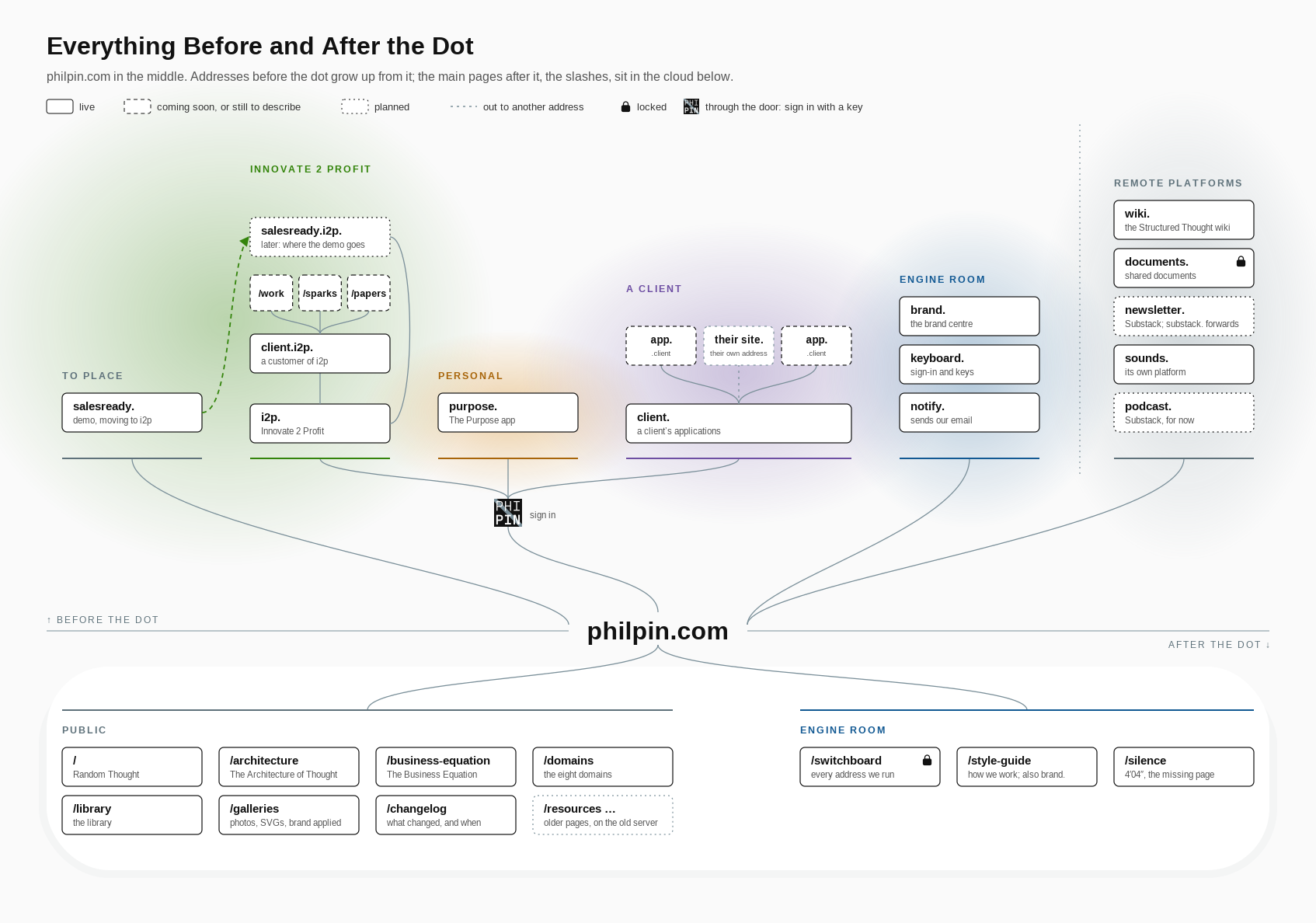
Everything Before and After the Dot
All of it on one page. Addresses grow up from philpin.com; the main pages, the slashes, hang below it. The lines through the square need a key. Here the clients are stand-ins; the Switchboard has the map with every name on it.
Adding One
- Name it, and decide which kind it is.
- Give it its address, and add it to the Switchboard.
- If it is an application with its own name: its mark, its accent and its brand page.
- Until it is ready: the Splash.
- Log it on the Rollout page.